TL;DR
A Shopify store I worked on had 479 pages indexed and 6,540 not. That is normal, not broken. Most of that list is pages the platform created and nobody wrote. Before diagnosing anything, check whether a page you actually care about is in there. Usually there isn’t one.
Here is the Page Indexing report for a Shopify store I have worked on.

Four hundred and seventy-nine pages indexed. Six and a half thousand not.
That is not a broken site. It sells, it ranks, it has a real business behind it. It is a normal Shopify store, and the ratio is normal too, which is the part worth sitting with before you do anything about it.
Open the same report on your own site and there is a row called Crawled, currently not indexed. On most sites it is not a small number. On a Shopify store it is routinely larger than the number of pages you think you have.
The status itself is unambiguous. Google found the URL, spent the resource to crawl it, looked at what came back, and decided not to put it in the index. There was no error. Nothing is broken. Google simply did not think the page was worth keeping.
What happens next is almost always the same. The client sees a number in the thousands, reads it as a verdict on the site, and wants it fixed.
In my experience that number is mostly pages the platform created on its own. Nobody wrote them. Nobody linked to them. Nobody would miss them. Google has looked at them and declined, which is the correct outcome, and the report is doing its job.
So before any of the diagnosis below, there is one question that settles most of these conversations: is there anything in that list you actually care about?
First, find out whether any of it matters
Do not start at the top of the list and work down. Start by looking for pages that were meant to earn something:
- the home page
- service pages
- collection pages
- product pages
- location pages
- blog posts
If none of those are in there, you are looking at platform exhaust. The work is a cleanup job, stopping the pages being generated, and not an investigation. A great many clients have spent months worrying about a number that meant nothing was wrong.
Google’s own crawl budget guidance puts the threshold for even thinking about this at one million or more pages updating weekly, or 10,000-plus pages updating daily. A seven-thousand-URL Shopify store with a few hundred real products is in neither bracket. Whatever is happening on that site, it is not that Google ran out of crawl budget, which is the explanation clients arrive with about half the time.
If one of those pages is in the list, open it yourself. On a laptop and on a phone.
Not in a crawler. Not in a tool. In a browser, on both, as a customer would meet it. Mobile matters more than laptop here, because that is predominantly what Google is indexing from. A page that renders fine on a desktop and collapses on a phone is not a mysterious indexing problem. It is a broken page, and you have just found the cause in under a minute.
A surprising number of these are resolved at exactly that point, because the page is visibly not what the person believed they had published.
If the page loads properly on both, submit it for indexing in Search Console and watch what happens.
Then ask whether the page should exist
Here is the breakdown for that same store.
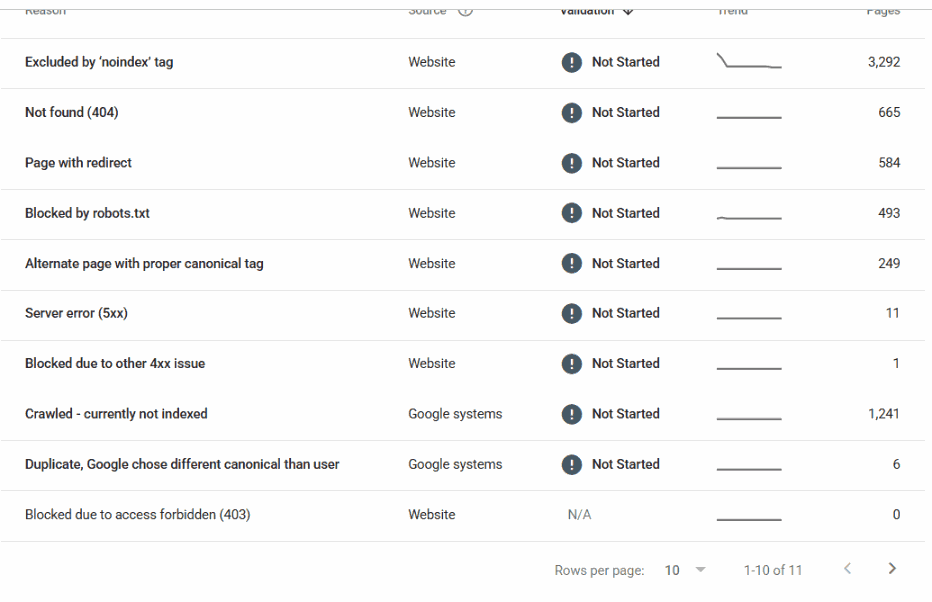
1,241 pages crawled and not indexed. That alone is more than twice the number of pages Google has actually indexed.
But look at the row above it. 3,292 excluded by a noindex tag, half the entire report. Somebody, at some point, told Google not to index those. Almost certainly not deliberately, one by one. That is the theme doing it, or an app, or a setting nobody has revisited.
Most of the URLs in these reports were never deliberately created. They are a by-product of the platform.
Shopify is the clearest example, because it generates a great deal on your behalf. Collection URLs that duplicate each other. Product URLs available under several paths. Tag pages. Filter combinations. Vendor pages nobody linked to. None of it was a decision anyone made. It is just what the platform does when you add products.
It is worth knowing how normal that is at scale. Ahrefs looked at 14 billion pages in their Content Explorer index and found 96.55% of them get zero traffic from Google, with another 1.94% getting between one and ten visits a month. Their own caveat is that the sample skews toward the better end of the web. So the honest read is not that 96% of pages are bad. It is that the web is overwhelmingly made of pages nobody was ever going to visit, and a Shopify store generating four thousand filter URLs is not an outlier. It is the median case.
WordPress does the same thing more quietly. Author archives on a single-author site. Date archives nobody will ever browse. Tag pages with one post in them. Attachment pages, if nothing has been done about them.
So the first question is not how do I improve this page. It is did I mean to publish this page at all.
If the answer is no, there is nothing to improve. Google has already made the correct decision about it, and you are looking at a report that is functioning exactly as intended. The work is to stop generating the pages, not to fix them.
That reframing removes a large share of the report on most sites before you have diagnosed anything.
When it is a content problem, improve it or delete it
For the pages you did mean to publish, thin content is the main cause. I do not have a contrarian position on this. The standard advice is correct.
Where I differ is on the second option. The advice is usually given as improve the content, and improvement is treated as the only acceptable answer. It is not. For a lot of pages the honest answer is that they should not have been written, and the correct action is to remove them.
A page that exists because someone decided the site needed more pages is not going to become valuable by having more words added to it. Google has looked at it and told you what it thinks. Adding four hundred words does not change the underlying fact that the page has nothing to say.
Improve the ones with a real reason to exist. Delete the rest. Both are legitimate outcomes, and treating deletion as failure is why these reports grow.
The causes that are not about content at all
The remainder are technical, and they are the ones that get missed because everyone has already accepted the content explanation.
- The sitemap was never submitted. It happens far more often than it should, including on sites that have had an agency for years. It does not directly cause this status, but on a large site with weak internal linking it changes what Google prioritises, and it is a thirty-second check.
- Googlebot is spending its time on the wrong files. In Search Console, under Settings, the Crawl Stats report breaks requests down by file type. Here is a WordPress site, a local business with fewer than a hundred pages worth indexing:
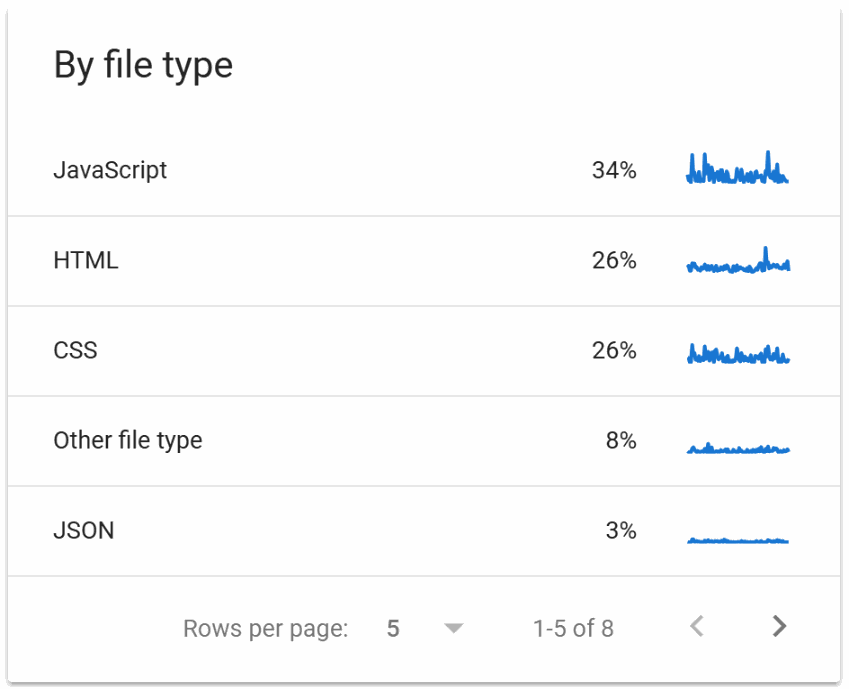
JavaScript 34%. CSS 26%. HTML 26%.
Googlebot spent more of its time on this site fetching stylesheets and scripts than fetching pages. Only about a quarter of everything it requested was a page at all. Google is not refusing to index the content so much as never getting a clear run at it, because most of what it collected was furniture.
That site is not unusual either. HTTP Archive’s 2025 Web Almanac crawled 16.2 million sites in July 2025 and found the median mobile home page ships 632 KB of JavaScript against 22 KB of HTML, roughly twenty-eight times more script than document. Googlebot has to fetch the first to see the second. What the file-type chart is showing you is not a fault so much as the shape of the modern web arriving in your crawl stats. The question is only whether your site is worse than the median, and by how much.
That is a plugin and theme problem, not a writing problem, and no amount of rewriting will touch it. It is also two clicks from the report everyone is already staring at, and almost nobody looks at it.
A warning about reading that chart. If you are looking at a domain property rather than a single host, the breakdown covers every subdomain together. I have a client property showing JavaScript at 95% and HTML at 1%, which looks catastrophic until you open the host list and find that a static asset subdomain accounts for 1.1 million of the 1.16 million requests. The main site is fine. The chart was describing a CDN.
So segment by host before you conclude anything. The file-type chart is one of the more useful screens in Search Console and one of the easiest to misread.
The server is not answering reliably. The same screen has a Host Status line covering robots.txt fetching, DNS resolution and server connectivity.
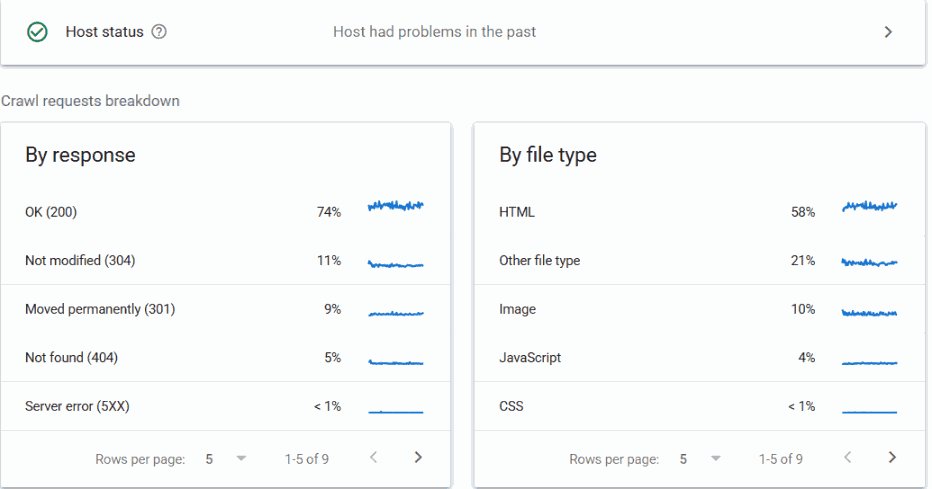
Look at what that one says: host had problems in the past. It is a green tick with a caveat attached, and it is very easy to scroll past a green tick.
Intermittent failures do not always surface as errors anywhere else, and they change how much Google is willing to attempt. Worth opening rather than accepting the tick.
How long it takes once you have fixed it
Around three weeks, in most cases, for pages to start being indexed after the actual cause has been addressed.
Not three weeks from when you make the change. Three weeks from when you make the right change, which is a different date and usually a later one.
If it has been six weeks and nothing has moved, the assumption to revisit is not the timeline. It is the diagnosis.
The short version
The status is not a verdict on your writing. It is a description of what Google did.
Work through it in this order:
- Is anything in the list important? Home page, service, collection, product, location page, blog post. If none of those are there, stop. Nothing is wrong.
- If one of them is there, open it on a laptop and a phone. Most problems are visible at this point, and mobile is where they show up.
- If it loads properly on both, submit it for indexing and watch what happens.
- If the page is one you meant to publish and it is thin, improve it or delete it. Both are fine.
- If it is none of those, go technical. Sitemap, crawl distribution by file type, host status.
- Give it three weeks from the correct fix, then re-examine the diagnosis rather than waiting longer.
Most of the sites I am called into have spent months on step four, for pages that never should have got past step one.
If a site should be ranking and is not, that is the work I do. Technical SEO covers the crawling, rendering and indexing layer. If you are not sure which of several plausible problems is the one costing you, that is what an SEO audit is for.