The verdict
Someone sends me a URL and says the site should be ranking. The first pass takes up to three days, runs entirely from the outside, and none of it is backlinks or Search Console. Most sites I am called into have a problem in the first four checks and have been buying links for a year.
A med spa came to me because the site wasn’t showing up locally. Good clinic, real reviews, services people search for every day.
The address in their footer linked to a Google Maps listing for a different business. So did the address on the contact page. The map embedded on the contact page was that other business too, and the Instagram icon in the footer went to that company’s account.
Nobody had done anything wrong on purpose. A previous build had been adapted from another clinic’s site and those links came with it. But for anyone arriving, a customer or a crawler, the site’s own contact details pointed somewhere else.
That took about four minutes to find, and no keyword tool was involved.
This is what I do when someone sends me a URL and says the site should be ranking and isn’t. I start on the home page and work down. The whole first pass takes up to three days, and almost none of it is spent where people expect.
Here’s the order, and more usefully, why it’s in that order.
Before anything: start the crawl
The first thing isn’t really a check. I put the URL into Sitebulb, and Screaming Frog does the same job, then let it run.
A crawl on a real site takes time, and there’s no sense watching it. So it churns while I look at the site the way a customer would, and I come back once there’s something to read.
Worth saying, because published checklists always present themselves as a clean sequence and real work isn’t one. The crawl is the fourth thing I read. It’s the first thing I start.
1. The home page
The most important page on the site, and where I always begin.
I think of the home page as a movie trailer. It isn’t the film. Its job is to show enough of what the business is, snippets, glimpses, a sense of the thing, that a stranger decides to stay. A real photo of the owner. Testimonials from people who exist. Enough of the story that the business reads as legitimate.
It’s the first impression when you meet someone. You know within seconds whether you’re going to keep talking.
Does it say what the business actually is? Plainly, near the top, in words a customer would use. A great many home pages describe a mood rather than a business.
Does it link down to the pages that matter? This is the one I find broken most often. On a local site the home page should link contextually to the service pages, inside the copy, not only from the menu. On a Shopify store, to the collection pages.
Menu links are fine, but every page has those. A contextual link from the home page body, with anchor text that describes the destination, says something different about what that page is for.
Two variants of this I’ve found recently. One clinic’s home page linked to the same service page twice, from two different places, and to three other services not at all. Another home page had plenty of text but none of it mentioned a single service by name.
Is the structure sane? A chiropractic clinic I looked at had seven H1 tags on the home page, several of them empty. There were blank H2 tags too. That’s not somebody’s SEO strategy, it’s a page builder emitting headings for layout reasons.
I mention this because it’s invisible. The page looked fine. It looked good, in fact. You only see it if you look at the markup, which is why it survives years of people wondering why the site doesn’t rank.
Is there a testimonial section and an FAQ? Both earn a place.
I’ll be straight about why this is check one rather than something more technical: a home page that doesn’t establish trust makes everything downstream a waste of effort. Rank a page like that better and you’ve only sent more people somewhere to bounce off. That’s a conversion problem more than a ranking one, but it’s the reason I won’t spend three days on a site and skip it.
2. The header and footer menus
Then the navigation, on the assumption nobody has looked at it since the theme was installed.
I check that links work, where they point, and what’s being given prominence.
On one clinic site, a header menu item labelled Athlete Care pointed at /elementor-685/. That’s an unfinished page-builder draft. It was in the main navigation of a live site, on every page, being crawled every time.
On a Shopify store I audited, the header menu item names had all been assigned H2 tags by the theme. So had every product name on the home page and collection pages. A collection page with forty products was handing Google forty H2 headings that were just product names, before any of the actual page content.
That’s a theme-level default, it’s on thousands of stores, and almost nobody looks for it.
Elsewhere, a clinic’s blog posts didn’t display the header menu at all. Every post on that site was a dead end. A visitor landing there from search had no way through to a service page except the back button.
Home, about, contact, blog and the real target pages should be reachable from the menus. Often one of them isn’t.
3. Reading the crawl
By now the crawl has finished. This is where the mechanical problems surface: broken pages, multiple or missing H1s, duplicate titles and descriptions, title lengths, canonicals, noindexed URLs, external links, orphan pages.
Most of that is ordinary and every crawler reports it. Three things are worth more attention than they get.
Scale. The numbers on a real site are not what people imagine. One Shopify store came back with 1,562 URLs with a missing or empty H1. An auto accessories store had 1,301 URLs missing an H1, and 1,347 pages with either no canonical at all or a canonical still pointing at the http version. The same 1,347 were missing a meta description.
Nobody creates 1,562 problems by hand. At that scale it’s always one template or one setting, and finding what produced it matters more than the list.
Pages the platform invented. That Shopify store had 659 tag pages, competing with the collection pages that were meant to rank. Nobody wrote them. Nobody linked to them deliberately. They exist because the platform makes them.
Orphan pages. These are pages nothing links to. Not from the menu, not from another page, not from anywhere. A visitor can only reach one by typing the URL.
The auto accessories store had 1,277 orphan pages against 1,630 pages indexed in Google. Most of that site was unreachable from the rest of it.
That’s the finding I most often have to explain twice, because every one of those pages exists, loads, and looks completely normal when you open it.
And it isn’t only a big-site problem. Here’s the internal URL summary from a crawl of a small outdoor gear store:
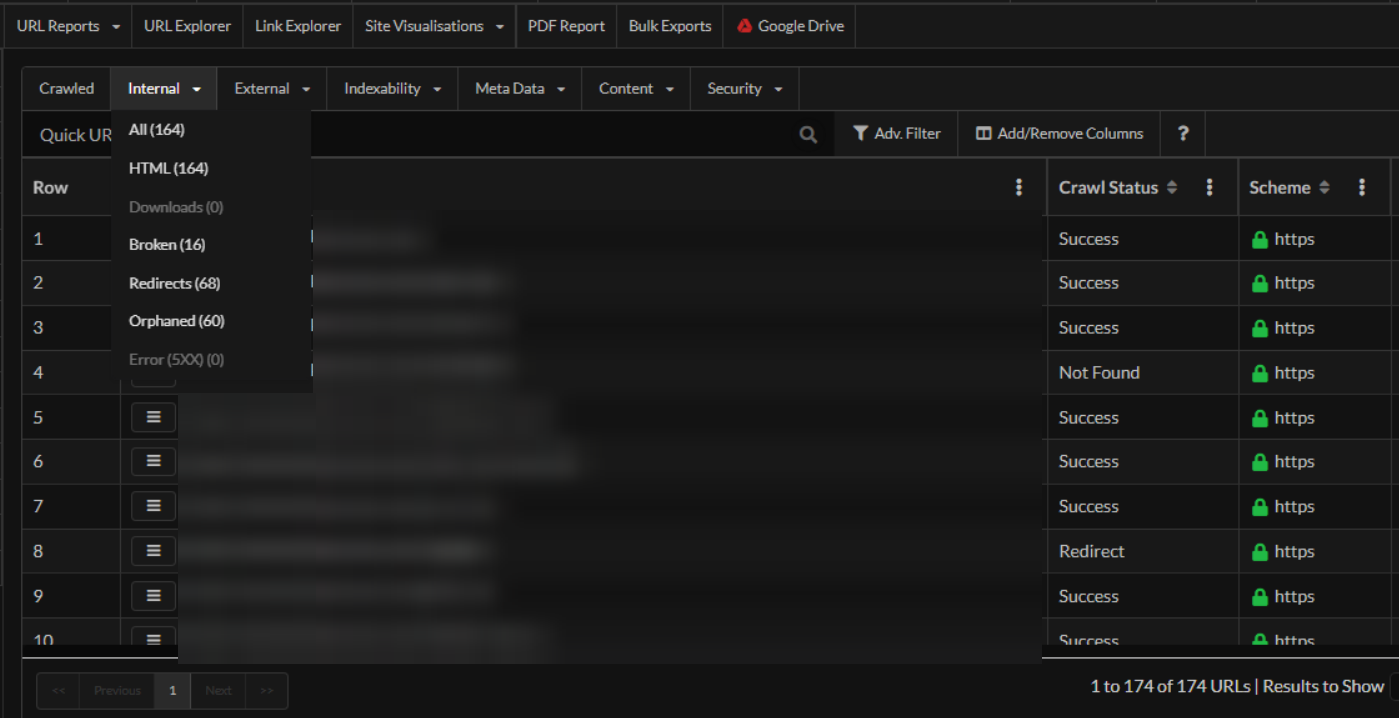
One hundred and seventy-four URLs in total. Sixty of them orphaned. Sixty-eight redirects and sixteen broken pages on a site you could read end to end in an afternoon.
Over a third of that store was pages nothing pointed at. The owner knew about none of it, and no amount of writing better product descriptions would have touched it.
4. Redirects
Short, and occasionally it answers the whole question.
The www version should resolve to non-www, or the other way round. I don’t much mind which, as long as it’s consistent. HTTP should redirect to HTTPS. Canonicals should be self-referencing and on the https version, which as above is frequently not the case.
When this is wrong it’s usually been wrong for years, and it means the site has quietly been running as more than one site.
Worth knowing how much of this is still out there: HTTP Archive’s 2025 Web Almanac found 91.5% of mobile pages served over HTTPS, so roughly one page in twelve still isn’t, more than a decade after Google called it a ranking signal. But the ones I actually find are almost never a site that never migrated. They are a site that migrated years ago and left the canonicals pointing at http, which no visitor will ever see and every crawler will.
5. Is there enough site here at all?
Then I stand back and ask whether there’s enough substance to rank on.
This is a judgement, and it differs for local, ecommerce and national sites. But I carry rough tripwires:
- fewer than about 50 well-written blog posts and the site probably hasn’t said enough to be taken seriously on its topic
- a service or collection page at 300 words with a single heading almost certainly hasn’t covered what a buyer needs. The ones that work tend to run longer, with an H1, several H2s and some H3s underneath
- target pages generally want an FAQ section
A medical education site I audited had 189 indexable pages, of which 93 were under 500 words. Half the site was pages that didn’t say enough to be worth indexing.
One caution on using any of this as a benchmark. The 2024 Web Almanac put the median mobile home page at 364 words. If you measure yourself against the web, 300 words looks perfectly respectable. That is the trap. The median page on the internet is not your competition. The four pages already ranking for your query are, and they are not median, or they would not be there. Clearing the average is how a site ends up indexed, unremarkable, and stuck.
Now the important part. These are not targets. There is no ideal page length, Google has said so plainly, and writing to a word count produces exactly the padded, say-nothing page that got the site here.
They’re tripwires. When a page falls well under them, it’s a reliable sign nobody has properly answered the question that page exists to answer. The number tells me where to look. Reading it tells me whether there’s a problem.
Pad a thin page to 1,200 words and you have a longer thin page.
6. Internal linking
I open a handful of pages at random and read the links inside the content.
What I find, over and over: pages with no contextual internal links at all, pages with far too many, generic anchor text such as “click here” and “read more”, and naked URLs used as anchors.
Two examples from one med spa. A hormone therapy service page had no internal links whatsoever. A weight loss service page had exactly one, to the contact page. The blog posts linked to each other using the raw URL as the anchor text, and never linked to a service page at all.
That’s a site publishing content that supports nothing.
Internal linking is the part of SEO nobody needs permission or budget for. It costs nothing, it’s entirely within the owner’s control, and it’s neglected on most of the sites I’m called into.
7. The about page
Almost always thin, and almost always disconnected.
Two checks: does it link back to the home page, and to contact. Usually neither. One med spa’s about page had a single internal link on it, to the contact page, and nothing else. Another site didn’t have an about page at all.
The bigger problem is what’s on it. Most about pages say the business was established in a year and is committed to quality. That isn’t a story and it tells nobody anything.
Every brand has a story. Why the person started, what they did before, who the team are. That’s where the trust the home page promised gets substantiated or doesn’t.
8. The contact page
Same pattern. Thin, and treated as a form rather than a page.
I look for a link back to the home page, the Google Business Profile map embedded, and the address and phone number present as text.
On local sites this is where the damage tends to be. Beyond the med spa at the top of this post, the recurring one is subtler: the address on the site doesn’t exactly match the address on the Google Business Profile. Not wrong, exactly: a suite number formatted differently, an abbreviation, a missing line. It’s the sort of difference a human wouldn’t notice and a machine can’t ignore.
Two of the local sites I looked at recently had no GBP map embedded anywhere at all. One had the map embedded, incorrectly, in two places.
9. Reviews and the profile
On local work I look at the Google Business Profile alongside the site, because ranking in the map pack and ranking the website are two different jobs and clients rarely separate them.
Mostly I’m looking at review volume against the competition rather than in isolation. One clinic had 93 five-star reviews, which sounds excellent until you look at who they’re competing with. A med spa had 8. Neither number means anything until you’ve looked at the other businesses in the pack.
What I don’t look at for the first three days
You’ll have noticed there’s nothing here about backlinks.
That’s deliberate. On-page is the foundation of a website, and I want to know the foundation is sound before I look at anything built on top of it. Links pointing at a site whose home page doesn’t say what the business does, whose service pages have no internal links, and a third of whose URLs are orphaned are not going to fix any of that. They’ll send authority into a structure that can’t carry it.
I do get to off-page work. Comparing a site against the three or four businesses beating it on traffic, ranking keywords, referring domains and pages indexed, is a real part of a full audit and sometimes it’s where the actual answer is. Occasionally a site is doing everything right on-page and is simply outgunned, and the honest finding is that it needs links and time rather than another round of fixes. But I can’t tell that from the outside until I know the site itself is coherent, because otherwise I’m attributing to competition what’s really a broken template.
So it’s sequencing, not dismissal. Foundation, then everything else.
The second thing missing is Search Console, and that one’s practical rather than philosophical.
A proper Search Console audit tells you things nothing else can: what the site is already getting impressions for, which pages Google has actually indexed, which queries sit in positions four to twenty and need a nudge rather than a rewrite. It’s some of the most useful data available on any site.
But it’s the client’s data, and I need them to grant me access before I can see any of it.
Which is why the three days above are structured the way they are. Everything on this list can be done from the outside, with nothing but a URL. No logins, no access requests, no waiting on an agency to release something. That’s the entire point of the first pass. It tells me whether there’s a real problem worth either of us spending money on, before anyone has signed anything.
What happened
Two of these, a Shopify store and a local clinic.
Same pattern in both. Nothing moved for three to four weeks after the work went in, then it started. On the local site the service pages began showing up. On the Shopify store the collection pages and the home page both improved in rankings and impressions.
The three-to-four week gap matters, because that’s the point where most people conclude the work didn’t help. It isn’t long enough to draw a conclusion from. It’s roughly how long it takes for a site to be recrawled, reassessed, and for anything to surface.
Why I’m not going to claim one change caused that
Here’s where I part company with how these stories usually get told.
The convention is a before-and-after graph, a green arrow, and an implied straight line from one change to the recovery. I’m not going to give you that, because I don’t believe it and neither should you.
Rankings move for many reasons at once. Sites get worked on while other things happen to them: an update lands, a competitor changes, seasonality does what seasonality does, the client runs a campaign nobody mentioned. When a set of fixes goes in together and things improve a month later, the honest description is that things improved after the work, not because of any single item in it.
Anyone showing you a graph proving one change caused a recovery is guessing with more confidence than the data supports.
What I can tell you is narrower and more useful: these are the problems that were there, this is the order I found them in, and this is roughly how long before anything moved.
The short version
Up to three days, in this order:
- Start the crawl and leave it running.
- The home page: what the business is, whether it earns trust, whether it links contextually to service or collection pages, and how many H1s it’s actually emitting.
- Header and footer menus: working, pointing somewhere real, and not handing out heading tags for layout.
- Read the crawl: missing H1s, duplicate and missing titles and descriptions, canonicals, noindexed URLs, platform-generated pages, orphans.
- Redirects: one canonical host, HTTPS enforced, self-referencing canonicals.
- Is there enough site here: judged by reading, not counting.
- Internal linking: contextual links inside the content, anchor text that means something.
- About page: linked, substantial, an actual story.
- Contact page: linked, map embedded, address matching the profile exactly.
- The profile and reviews, on local work, against the competition rather than in isolation.
All of it from the outside, on nothing but a URL. Backlinks, competitors and Search Console come afterwards.
Most of the sites I’m called into have a problem somewhere in the first four, and have been spending money on links for a year.
If a site should be ranking and isn’t, that’s the work I do. An SEO audit is this process run properly and written up. Technical SEO covers the crawling and indexing layer underneath it, including what “crawled, currently not indexed” actually means, which is where a lot of these end up.