The verdict
On a Shopify store I audited, every header menu item and every product name was wrapped in an H2. A collection page handed Google forty headings before a human had written anything. Eight of eleven audits had a heading problem. It is a weak ranking signal and a wasted slot.
On a Shopify homeware store I audited, every item in the header menu was an H2.
Not styled to look like one. Actually wrapped in <h2> tags. So was every product name on the home page, and every product name on every collection page. A collection page listing forty products had forty H2 headings before you counted anything a human had written.
That store also had 1,562 URLs with a missing or empty H1.
That is less exceptional than it sounds. HTTP Archive’s 2025 Web Almanac found an H1 present on only 70% of mobile pages, and non-empty on just 66%, so roughly a third of the web has no usable top-level heading at all. Which is the first thing to be clear about: this is not the reason your competitors are beating you. Most of them have the same problem.
So the pages had no top-level heading and forty second-level ones, and the second-level ones said things like “Shop” and “About” and a product SKU. As a description of what the page was about, it was worse than nothing.
None of this was visible. The site looked good. It converted. You only find it by reading the markup, which is exactly why it survives for years while everyone wonders why the collection pages don’t rank.
Four sites, four ways of getting it wrong
I pulled every heading finding out of the audits in my folder. Eight of eleven had one. They were not the same mistake.
Headings used as font sizes. The Shopify store above. Someone needed the menu text larger, reached for an H2, and the theme carried it site-wide.
Headings used for layout depth. A continuing-education platform where the navigation was wrapped in H4 and H5 tags, a long run of them with several completely empty, and the page carried two H1s, “LIVE CE LINEUP” and “FEATURED HOME STUDY CE”, with no H2 anywhere. The outline went H1, H1, H3, H4, H5, skipping the level that would have organised any of it.
Headings attached to invisible furniture. An agency site where H1 and H2 tags were bound to the logo. They appeared on every page and every post, and they rendered as nothing at all, with no text a visitor could see. Every page on that site had a heading structure that began with an element nobody knew existed.
Headings emitted by a page builder. A chiropractic clinic with seven H1 tags on the home page, several of them empty, plus a run of blank H2s. Nobody chose that. A builder emits a heading for each section container whether the section has a heading or not.
Different platforms, different causes, same result: the heading structure describes the layout rather than the content.
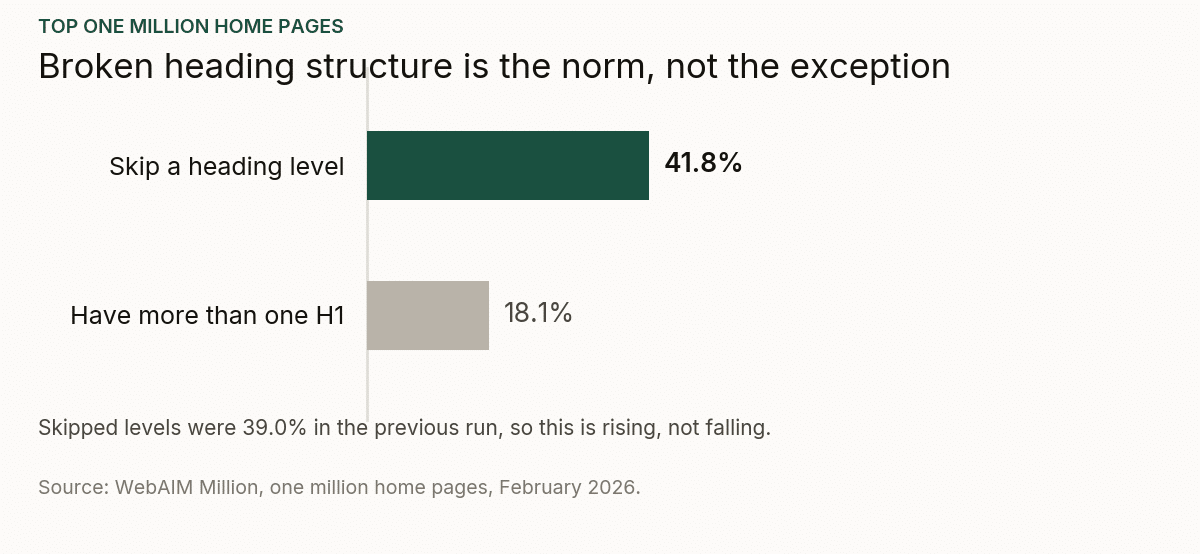
The pattern holds well beyond my folder. WebAIM crawled the top million home pages in February 2026 and found skipped heading levels on 41.8% of them, up from 39% the year before, with 18.1% carrying more than one H1. Two in five pages have an outline that does not survive being read in order, and the number is getting worse, not better, which tells you how few people are looking.
What headings are actually for
They are the document outline. That’s it.
If you stripped every image, every colour and all the body text off your page and kept only the headings, you should be left with a table of contents that tells a stranger what the page is about and how it’s organised.
Run that test on the Shopify store and you get: Shop. About. Contact. Blue Ceramic Mug. Grey Ceramic Mug. Speckled Bowl. Run it on the clinic home page and you get seven blank lines.
Google is not being tricked by any of this and it isn’t being harmed much either. Heading tags are a weak signal, and I want to be honest that this is not the reason a site is invisible. Search engines have coped with badly structured HTML for twenty-five years and they cope with yours.
The reason to care is narrower and it’s real: headings are one of the few places where you get to state, in plain language, what a page is about, in a position that carries structural weight. When the menu is using those slots, you have given the field away for nothing. Fixing it doesn’t add a signal. It stops you throwing one away.
There’s also a second reason that has nothing to do with rankings. Screen readers navigate by heading. A page with seven empty H1s and a menu wrapped in H2s is genuinely hard to use if you’re not looking at it, and that is a worse problem than the SEO one.
That is not a hypothetical. In WebAIM’s survey of 1,539 screen reader users, 71.6% said navigating the headings is the first thing they do on a long page, ahead of the find feature at 13.6% and reading through sequentially at 6.4%. For most of those people the heading outline is the page. If yours reads Shop, About, Contact, Blue Ceramic Mug, that is what they have been handed to navigate with.
How to check yours in about a minute
- Look at the outline, not the tags. Any crawler will export headings per URL. Sitebulb and Screaming Frog both do. What you’re reading is not “does it have an H1” but “does this list read like a table of contents”.
- Sort by count. Pages with zero H1s and pages with more than one are both worth a look, but the fastest tell is the H2 count. Anything with more than about ten on a normal page is a template problem, not a writing problem. Forty is a product grid.
- Look for empties. Blank headings are the signature of a page builder. If you have them, the fix is at the template level and it will fix every page at once.
- Then read one page’s headings out loud. Genuinely. If it doesn’t sound like an explanation of the page, it isn’t one.
Fixing it
The advice I’ve given in every one of these audits is the same and it’s unglamorous: replace the tag, keep the appearance.
Menu items, product names in a grid, decorative labels, footer column titles: none of these are headings. They should be normal text or a span, styled with CSS to look exactly as they do now. The visual design does not change. Nothing on the page moves. Only the markup changes.
Then give the page a real outline:
- One H1 that says what the page is. On a collection page that’s the category, not the store name.
- H2s for the actual sections of the content, in words a customer would use.
- H3s underneath those where there’s genuine nesting, and not otherwise.
- No skipped levels, no empties.
On the Shopify store that meant the collection page got an H1 naming the category, a handful of H2s for the sections of the intro copy and the FAQ, and forty product names demoted to plain text. The page looked identical afterwards.
A warning about page builders. If empty headings are being emitted by the builder, changing them in the editor is temporary. The next template update or section edit brings them back. The fix has to go into the theme or the section template, or it will quietly undo itself. I’ve watched that happen more than once.
The thing I’d rather you took away
Heading problems are almost never a writing failure. In eight of the eleven audits, the person who wrote the page did nothing wrong. A theme, a builder or a platform emitted the markup, and nobody has ever looked at it because it doesn’t show up on screen.
That’s the general shape of a lot of technical SEO. The problems that survive longest are the ones with no visible symptom, and heading structure is the purest example of it. Invisible to the person who owns the site, obvious in thirty seconds to anyone who opens the export.
The short version
- Eight of eleven audits had a heading problem. Menus as H2s, navigation as H4/H5, headings bound to the logo, seven empty H1s from a page builder.
- The test: strip everything but the headings. It should read like a table of contents.
- Headings are a weak ranking signal. This is not why your site is invisible. It’s a slot you’re wasting.
- The accessibility case is stronger than the SEO case. Screen readers navigate by heading.
- Replace the tag, keep the appearance. Nothing on the page needs to move.
- If a builder is emitting them, fix the template or the change will undo itself.
If a site should be ranking and it isn’t, that’s the work I do. Technical SEO covers the markup and rendering layer. If you’re not sure which of several plausible problems is costing you, that’s what an SEO audit is for.